Sees the quiet ones too
Instead of pinging one address after another, LAN IP Scan sends one tiny packet to every address and reads the system's ARP table. That finds devices that ignore ping, and gives their MAC address and vendor at once.
A free LAN scanner for Windows · version 0.2.2
LAN IP Scan detects every device on your local network, instantly displaying its IP and MAC addresses, manufacturer, name, latency, and open ports. Expand an entry to reveal more details; clicking on a port allows you to access a web interface, remote desktop, PuTTY session, or shared folders. It also features a built-in CVE vulnerability scanner.
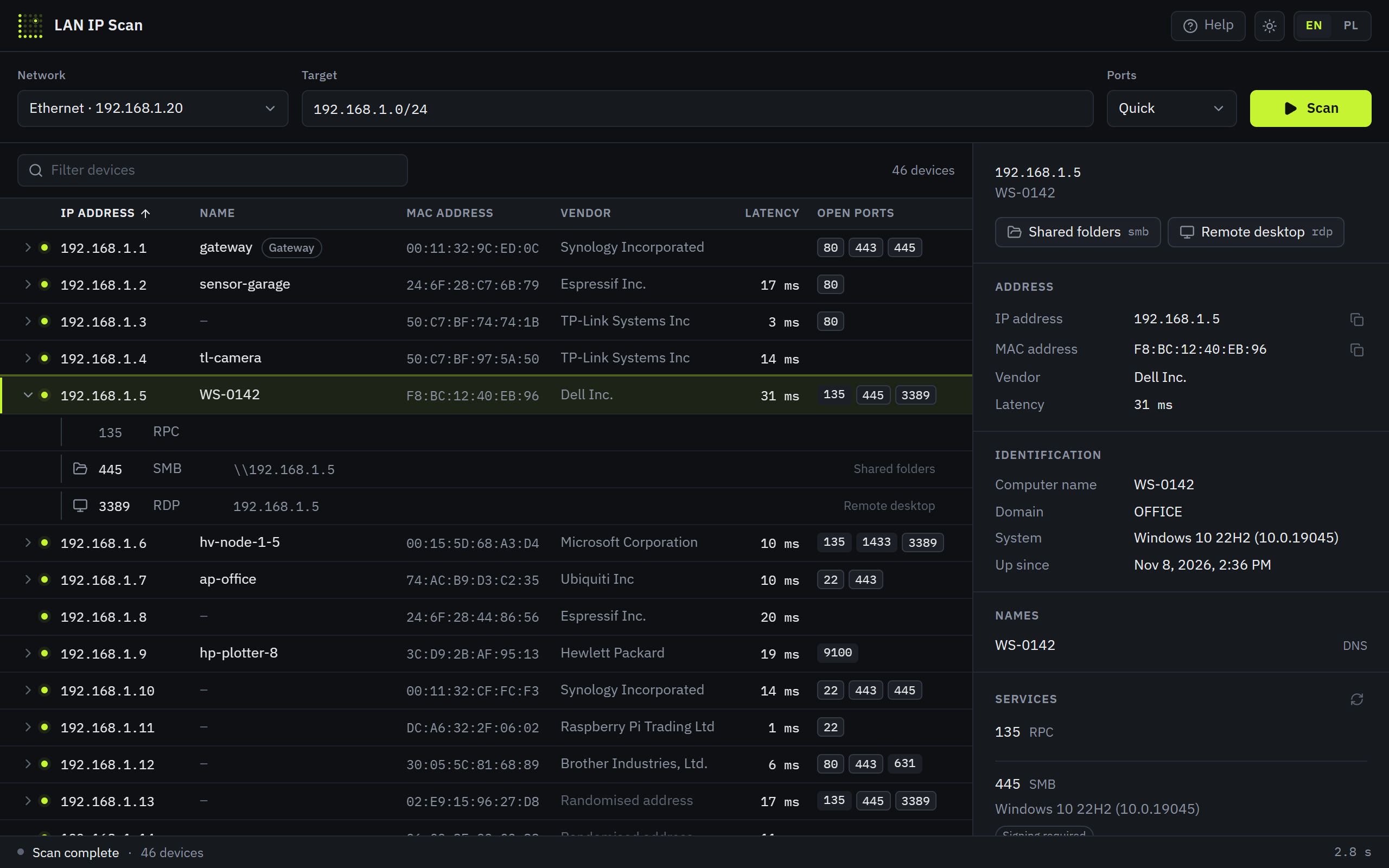
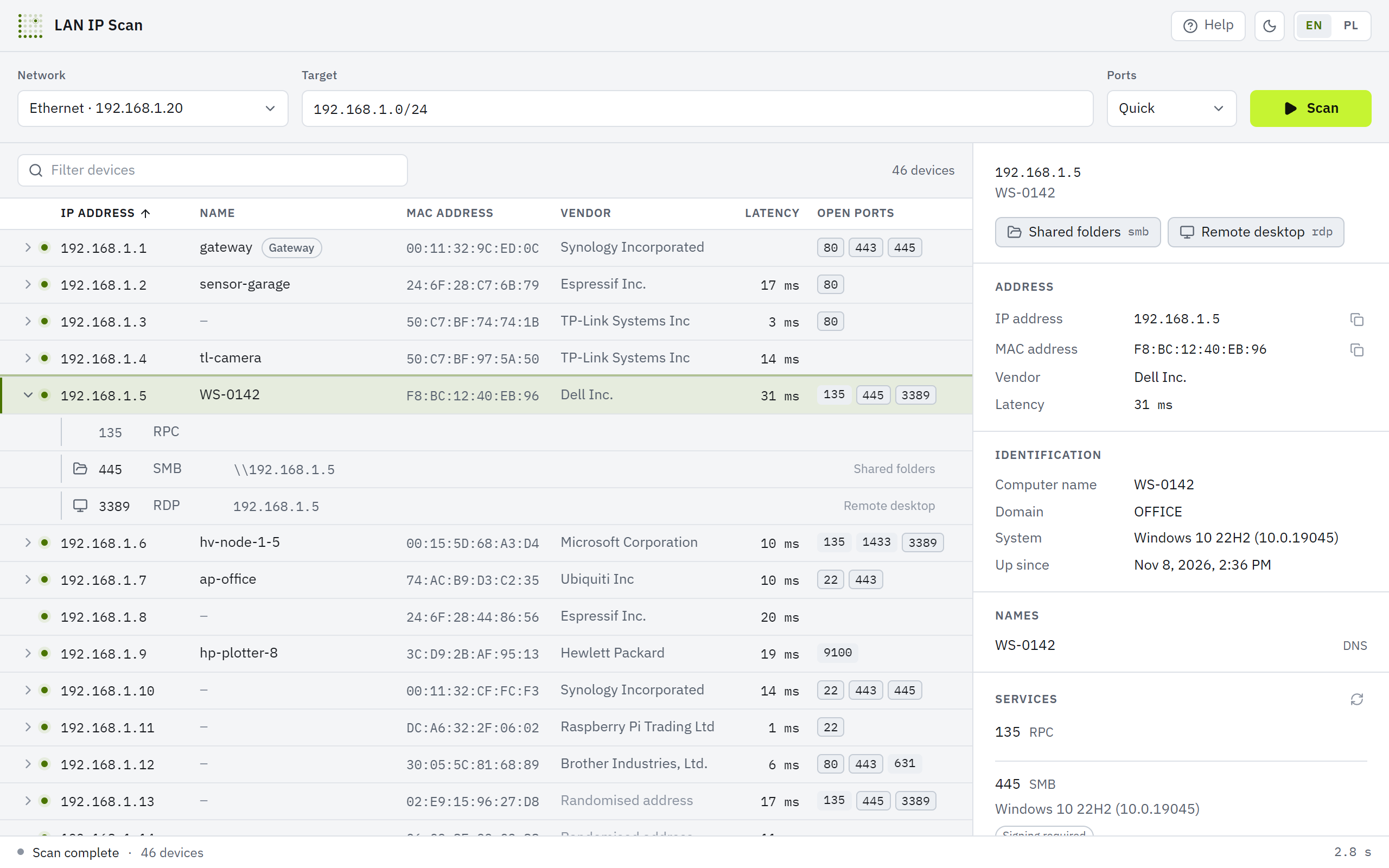
A row appears the moment a device answers and fills in as more is learned. You never wait for the scan to finish.
Instead of pinging one address after another, LAN IP Scan sends one tiny packet to every address and reads the system's ARP table. That finds devices that ignore ping, and gives their MAC address and vendor at once.
DNS, mDNS, NetBIOS and SNMP are asked at the same time. Printers, switches and air conditioners report their model, firmware and location themselves. Randomised phone MAC addresses are labelled as such.
Select a device and its services are read: the web server and its version, SSH, FTP, databases, TLS certificates. SMB and RDP give away the computer name, domain and Windows version, without any login attempt.
Expand an address like a tree and click a port: web pages open in your browser, 3389 in Remote Desktop, SSH and Telnet in PuTTY, 445 in Explorer with the shared folders.
For a single device you can run a scan for known vulnerabilities with nuclei, WordPress plugins included. nuclei is downloaded only when you ask, and every run asks you to confirm that you are allowed to test that device.
No telemetry, no account, no cloud. The app only talks to the addresses you scan. English and Polish, light and dark theme.
Just select a row. In about a second more than 60 common ports are checked and whatever answers on them is read.
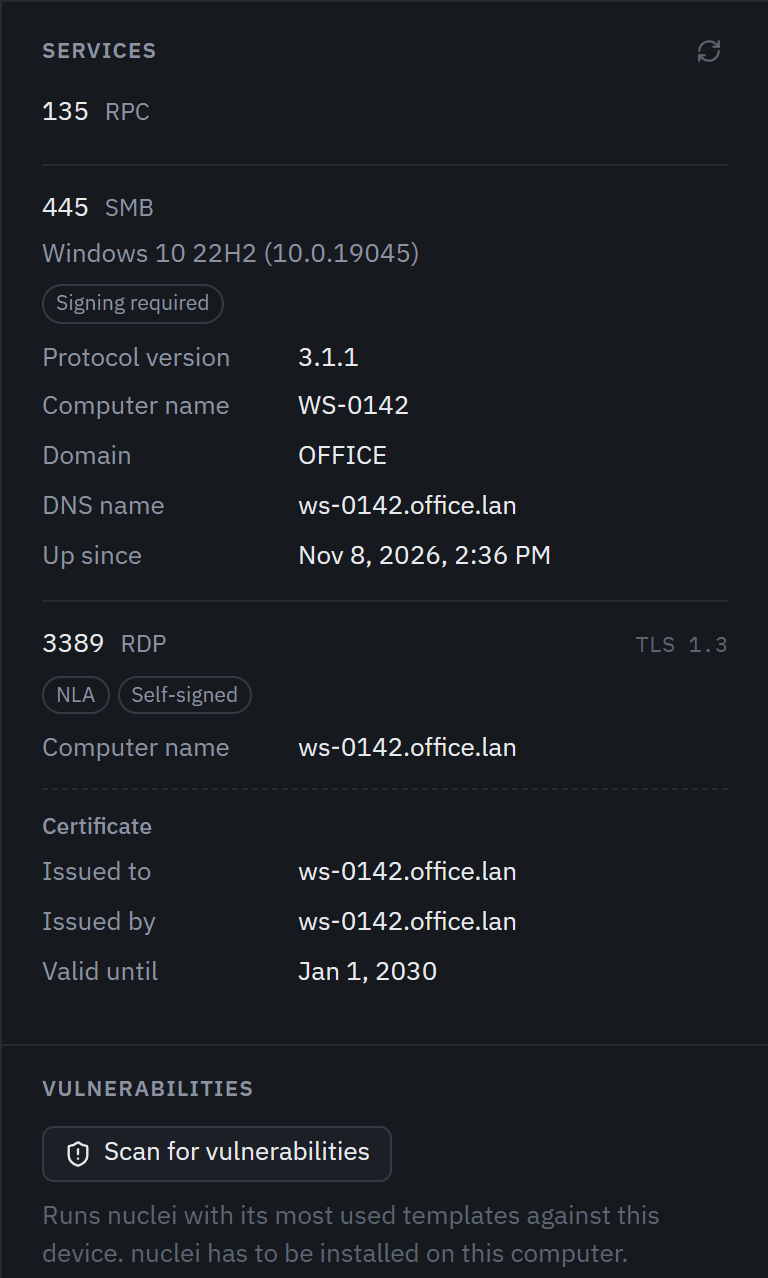
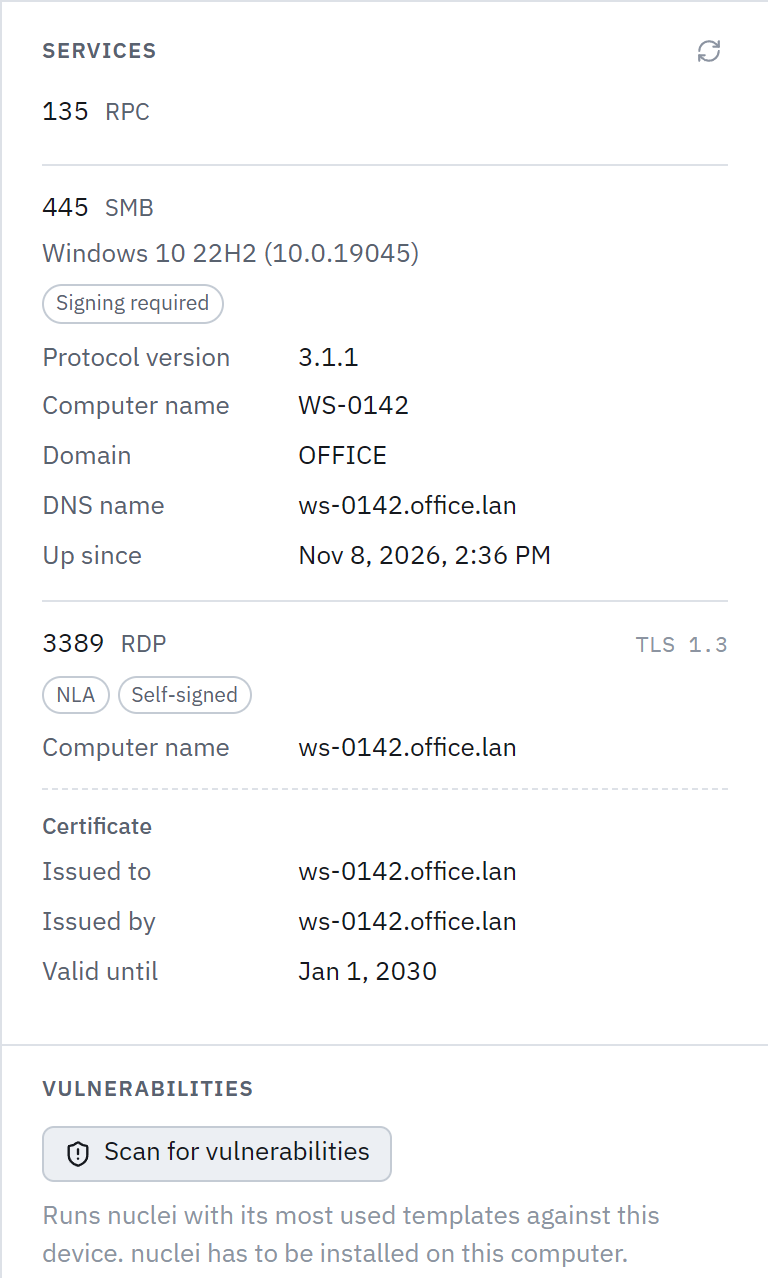
Vulnerability scanner
Found an old router, camera or server on the network that worries you? Check it without leaving the app. LAN IP Scan runs nuclei, an open tool with thousands of community-maintained checks, and shows every finding with its severity, from informational to critical. Before it starts you pick the groups of checks and the lowest severity, so it can be a full review or a quick look at only the most serious problems. Progress shows as it runs.
In a terminal: lanipscan vuln 192.168.1.10 --yes
In web servers, routers, cameras, NAS devices and popular applications.
Login pages of admin panels, and backups and configuration files reachable without a login.
Settings that open a device wider than they should.
Whether the device still accepts the vendor's default password.
Plugins and themes, when the app recognises WordPress on the device.
Windows, PHP and Apache past their vendor's support, and years-old OpenSSH, recognised already by the closer look.
The ZIP and the Linux download contain lanipscan, which does what the app does, in a terminal. Made for scripts, scheduled tasks and headless servers.
scan, inspect, vuln and interfaces; every option is also described in the app's Help menu.--json hands the results to jq, PowerShell or a spreadsheet.10.0.0.5-20, a name like nas.lan or a list.> lanipscan scan 192.168.1.0/24 IP MAC VENDOR NAME RTT PORTS 192.168.1.1 00:11:32:9C:ED:0C Synology gateway 0 ms 80,443,445 192.168.1.5 F8:BC:12:40:EB:96 Dell WS-0142 31 ms 135,445,3389 192.168.1.7 74:AC:B9:D3:C2:35 Ubiquiti ap-office 10 ms 22,443 192.168.1.12 30:05:5C:81:68:89 Brother printer 6 ms 80,443,631 192.168.1.16 50:C7:BF:22:F1:23 TP-Link SW-RACK-A 24 ms 80 … 46 hosts in 1412 ms, first after 6 ms > lanipscan inspect 192.168.1.5 --json > ws-0142.json
Version 0.2.2, released . Free, MIT licensed, no registration.
Windows 10 and 11, 64-bit
Installs for the current user, no administrator rights needed. Adds a Start menu shortcut.
Download · 3.4 MBNo installation. Also contains the command-line tool lanipscan.exe.
x86-64, glibc 2.34 or newer (Ubuntu 22.04, Debian 12 and later)
There is no macOS version and no Linux desktop app yet.
A Windows warning on first start? The files are not code-signed yet, so SmartScreen may say “Windows protected your PC”. Click “More info”, then “Run anyway”.
Check the file. In PowerShell: Get-FileHash .\file-name, on Linux: sha256sum -c SHA256SUMS.txt. Compare the result with the checksum on this page or in SHA256SUMS.txt
Start LAN IP Scan and click Scan, or press Ctrl+R. It picks the subnet of the active network adapter and lists every device in about two seconds, including the ones that ignore ping. Each one shows its IP address, MAC address, vendor and name. In a terminal, lanipscan scan does the same.
Scan the network, press / and type the vendor into the filter, for example Brother, HP or TP-Link. The filter also searches device names, ports and the description and location reported over SNMP, so a printer can often be found by its model alone.
The scan itself checks ports 22, 80, 443, 445 and 3389. Select a device and more than 60 common ports are checked, with the service and version that answers on each. In a terminal: lanipscan inspect 192.168.1.10.
Yes, on request and for one device at a time. From the details panel you can run nuclei's checks: known CVE vulnerabilities, exposed panels and files, misconfigurations and factory default passwords. Before it starts you choose which of these groups to run and from which severity, and a bar shows the progress. Slow devices, such as old NAS boxes, are tested more gently so requests do not run out of time. Independently of nuclei, the closer look flags software past its vendor's support or many years old, such as Windows 7 or OpenSSH 6.6. nuclei is downloaded from GitHub only when you click the button, and its checksum is verified. Before every run the app shows what will be sent and asks you to confirm that you are authorised to test the device. Checks that could overload a device or change anything on it are turned off. The first run takes a few minutes, because nuclei fetches its templates then.
From the MAC address. Its first part is a vendor number assigned by the IEEE, and LAN IP Scan carries the full registry of those numbers, so it does not go online for this. Phones and laptops with a randomised MAC address give no vendor away and are labelled as such.
No. The installer installs for the current user, and scanning only uses what every user may: plain UDP packets, the system's ARP table and ping. There is no Npcap or other driver to install.
No. There is no telemetry, no account and no background update. The app only talks to the addresses you scan. The one exception is nuclei: it is downloaded from GitHub only when you click the button, and on its first vulnerability scan nuclei fetches its templates.
Only scan networks you manage or have permission to scan. By default the app scans private networks. Public addresses need a separate confirmation, and a vulnerability scan asks every time whether you are allowed to test that device.
From SNMP. Every device found gets one read-only question with the standard community public. Nothing is changed and no other password is tried. It does not make the scan longer, because the question runs alongside the name lookups.
Linux has the command-line tool, with the same engine as the app. A Linux desktop app and a macOS version are in the works.
Nothing. LAN IP Scan is free, also for business use, under the MIT licence. The open-source libraries it uses and their licences are listed in THIRD-PARTY.txt.